Those clever phishers

Recently I received multiple emails from a PR company claiming they can generate media opportunities for me, whatever that means. I clicked on the emails because the heading mentioned a past interview I gave to another website and I thought it might be a real request since I also receive a lot of messages from legitimate PR companies. These emails mentioned my interest of publishing diverse voices and named my publishing company. Then I noticed that although the emails came from different people and were signed by different people, the messages were exactly the same and all of them requested I cc their co-worker “Shane.”

By mentioning something from someone’s past and posing it as a genuine request in the subject line, this gives a higher percentage of people opening the email instead of deleting it right away. It’s also quite easy to figure out my interests from my websites and social media postings. I worry about what phishers will think of next.

Hopefully my mind will still be sharp before the next wave of phishers come after me again! If you have faced similar phishers or even more clever ideas, please share!

Why a publishing house is selling design work

Recently we merged the Dark Helix Press newsletter mailing list with the Artsy Raven club mailing list due to limited time capacity. Marketing people will say we are doing something wrong, but we have too much to do and need to focus on creating things!

At Dark Helix Press we are working on new books, but we have also started making designs that are suitable for t-shirts, notebooks, mousepads, etc. These items are in our Threadless shop: https://darkhelix.threadless.com/

Books take a long time to make and are not easy to sell. Designs aren’t easy to sell either but people may pick up t-shirts or other items for their friends as gifts knowing there’s a better chance that material goods will be better liked than books.

All revenue from design work goes back into books because they are expensive to make and since we are a traditional publisher, the costs are all up front.

As a small press, Dark Helix will never qualify for any grants because there are conditions of selling X and reaching revenue of Y. We are a tiny player on a large playing field and over time, the larger companies have been merging into mega-corporations with different labels. The Goliaths are getting stronger and the Davids are trying new things to avoid them!

The future of the playing field for publishing seems bleak, as the larger Goliaths still have much control over the usual aspect of the industry such as access to bookstores, superstores (Walmarts, Costco, etc), databases and libraries. There are many emerging Davids over time – the self-publishers who are publishing themselves because the Goliaths refuse to. The most successful Davids are the ones that can get published by a Goliath for one or two books because the Goliaths have more marketing dollars and staff to make a book a success. It’s all still a gamble, but if the Goliath can shield a David temporarily it’s easier than a David struggling by themselves. Then after the partnership is over, the David can earn more from selling books themselves since there is no Goliath to take a giant cut of the revenue.

There are no easy answers to publishing success if you are a David! Throw in a mix of people using AI to the party and that changes everything as well! Hope my biblical analogy makes sense and have a great day!

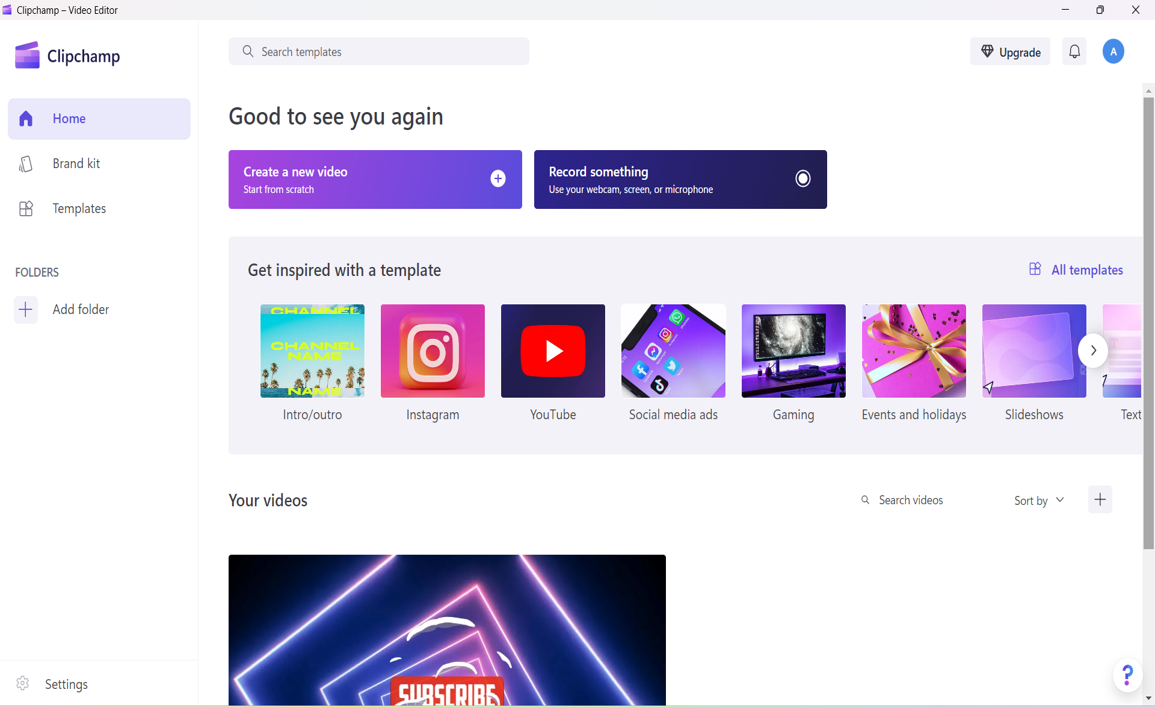
Clipchamp video editor

Finally a replacement for Windows Movie Maker! I was had been using Windows Movie Maker on an old PC and when it died, I wanted to install Movie Maker onto the new computer. You can still download it from non-Microsoft sites, but it no longer has support. I have mac access, but I always feel odd using apple computers so I like PCs better.

After doing some research I discovered “Clipchamp” from Microsoft which does the same thing as Movie Maker, but its interface it a bit different. The interface reminds me of Canva and other online graphic programs. Indeed, it’s a very visual way of editing video.

When you open the program there are a variety of templates to choose from or you can start by uploading your videos.

After you choose something, you go into the editing screen. The preview screen is quite large and on the sides are your tools. I found that the audio takes a while to load, so you can go make a cup of tea while that is happening. For video clipping there are scissors and you can just use the delete key to remove parts of the video you no longer want. Audio is editing is similar, everything is drag and drop or remove with scissors.

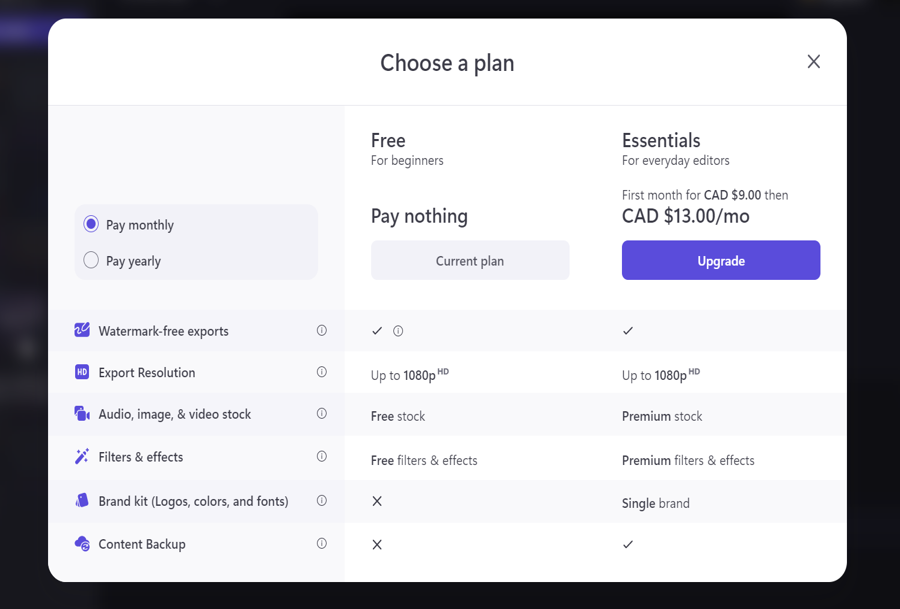
Right now I’m on the free plan. Paying the monthly subscription gets you more special effects and storage space on a cloud. Since I’m only starting out, I’m just going to stick to the free plan for now.

I downloaded the program versus using on the web because I didn’t want to upload videos all the time. If you do try out this program let me know how things go! Always open to tips and tricks to do better at video editing!

Kirsten McNeill answers “How do you deal with a negative review?” on Artsy Raven Eps 6

Kirsten McNeill is a writer, editor and business owner of KM Writing Services. She answers the question “How do you deal with a negative review?” on the Artsy Raven podcast, Episode 6. This clip is an excerpt from the episode.

Kirsten’s website is https://kirstenmcneill.com

The Artsy Raven podcast about writing & publishing episodes are on Spotify & Youtube: https://jfgarrard.com/arpodcast/

The Idea Shop answers “Why should an author hire a marketer?” on Artsy Raven Eps 5 podcast

Chris Houston, the Marketing Guru of The Idea Shop has over 20 years of experience in book marketing. The Idea Shop is a one-stop shop for fresh new ideas on how to promote creative endeavors of all kinds, from books to podcasts. The Idea Shop can be heard each month on Sauga 960 AM radio.

He answers the question “Why should an author hire a marketer?” on the Artsy Raven podcast, Episode 5. This clip is an excerpt from the episode.

To contact the Idea Shop on how your book can be marketed to the world, find Chris at https://theideashop.ca/

The Artsy Raven podcast about writing & publishing episodes are on Spotify & Youtube: https://jfgarrard.com/arpodcast/

Tools to make an awesome #lowbudget #video for #socialmedia!

Recently I signed up my indie publishing company, Dark Helix Press, to be a vendor at FIYAHCON, a virtual convention centering the perspectives and celebrating the contributions of BIPOC in speculative fiction. (I’ll be speaking about publishing there too, will release details when I have them.)

At FIYAHCON the vendors are setting up a virtual table on a platform called AirMeet which I have never used before. One of the items I needed to upload was a video and I don’t have any book trailers for Dark Helix Press. In the past I made a book trailer for The Undead Sorceress which was ok, but with new tools available, making a trailer now is much faster than ever before! The concept of making a trailer is the same to make any video for social media, once you learn how to make on video, it’s a skill which can be used for lots of creative fun!

The trailer I made below took about three hours, because I was fiddling with fonts/colors/layout and made some custom graphics for the Dark Helix Press Threadless Shop merchandise because I wanted “clean cut” items that would “pop out.” I had to use a graphic editor to do that (did it quick and dirty with the free Paint.net graphic program) because video programs have limited graphics editing capabilities. Note I had $0 budget, but the video looks pretty good for zero dollars!

Steps used to make a book trailer:

  1. List out what you want to put in each “slide” which is really a short video. Pretend it’s a PowerPoint and on each slide think about what message or text you want to convey.
  2. Find videos for each slide. There are a couple of sites you can download free videos, such as Pexels, Pixabay, Mixkit, etc. We used Pixabay.
    • For one video we wanted 14 seconds, but the shot we downloaded was 10 seconds, so we extended the video time by slowing down the speed of the footage.
  3. If you are adding extra graphics to the video, you will need to clean up with a graphics editor such as Paint.net, Krita, Adobe Photoshop, etc. We used Paint.net.
  4. Pick a program to compile the videos – Canva, Filmgora, iMovie, etc. We used Canva.
  5. Upload the videos into the program, add text, music (we used the music provided in the program) and graphics.
  6. In some of the programs you can modify the layout and animate the graphics/fonts.
  7. Upload onto Youtube and publish.
    • Read carefully on the sites where you gathered graphics, videos and music. Some of the licenses ask for attribution in lieu of payment and there may be restrictions on use.

I hope this information was useful to you! After you do it once, the subsequent videos will be easier next time!

Making #3d #bookcovers for #free! How to with link…#indie #publishing #writinglife #selfpublishing #marketing

On some sites I’ve seen 3d covers of books and wondered how people did it. Well, I know I can hire someone or buy software. But being a frugal person I wasn’t sure if it was worth the money so I never tried to do this. Fast forward a few years later and I’m talking to a book marketing person who is asking me about 3d covers.

Doing a Google search I found a website which lets you render a 3d cover for free! Of course it’s not the best quality (the graphic is small in size) and for a small fee you can pay to download the better version.

You will need 3 images in hand before you start: 1) Front cover, 2) spine only and 3) back cover. You can use any graphic program to crop your print book image file into pieces and just save as separate files.

For those who want to test out 3d covers, visit Boxshot which offers a free online program for use as well as better paid options: https://boxshot.com/3d-pack/3d-book/

On this website after uploading the 3 images of your book (front, spine, back), you can move the book around until you find an angle you like and then save the 3d image.

I did a test run for the Belief cover with the free option and it looks spiffy!

March 4 Asian Spec Fic Readings

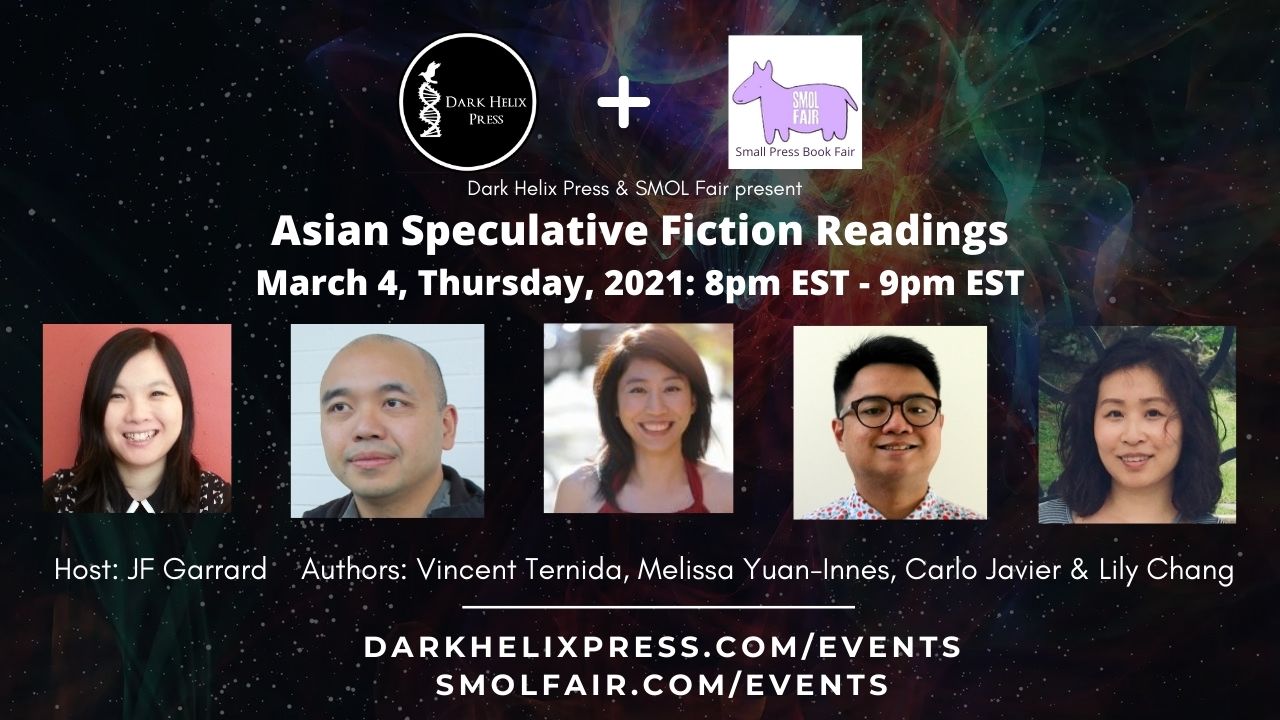
Next Thursday I’ll be hosting an Asian Speculative Fiction Reading event as part of Small Press Fair for Dark Helix Press. All of the authors are wonderful readers and I look forward to listening to them do their magic! Details about this event below!

Also putting together another digital raffle to test how successful it is as a marketing tool. Someone told me that all raffles need to be coupled with Amazon gift cards so we will try that. I do worry about coupling book giveaways with gift cards – do they want the gift card or to read the books? Sigh.

March 4, Thursday, 2021: 8pm EST – 9pm EST
Asian Speculative Fiction Readings panel features Asian speculative authors who will read their stories featured in Immersion or Dark Helix Ezine. There will be a Q & A after the panel.
Authors featured include Vincent Ternida, Carlo Javier, Melissa Yuan-Innes and Lily Chang. Host: JF Garrard

For free registration click here

For more events, visit this link: http://www.darkhelixpress.com/events/

See you soon!

Ingram Spark Vs Amazon KDP Createspace

For publishing purposes, mainly I’ve been using Amazon Createspace (print division) and Amazon KDP (e-books) for distribution. These two were merged recently and not much has changed other than the fact you don’t have to fill in tax info and log in twice. Some past receipts have gone missing, but other than that, the transition has been quite flawless. Creating a title for publishing has been great on Amazon. There is no charge for uploading, you keep what you earn minus fees.  If the print book comes damaged, they will offer to re-print another copy.

Some of my indie publishing friends have gone with both Amazon and Ingram Spark because they want the most out of distribution. Amazon distributes to limited venues and although Amazon captures 60% of the market, the other 40% is still land worth venturing into.

The site Ingram Spark has gone through many changes lately since I visited a few years ago out of curiosity. They provide very detailed manuals on how to publish and upload files. They have a live chat and telephone customer support system during office hours.  However, it costs $25-49 to upload a title and for every revision it will cost $25. There used to be an annual fee of $12 per title, but I believe that has been dropped now. Regardless, I had high hopes for Ingram given they are a giant distributor and supposedly more “professional” for publishing than Amazon.

Last night I tried to set up a title for both print and e-book distribution on Ingram Spark to try out their service. The first snag was the software on the website not allowing me to save the book title. The title “Trump Utopia of Dystopia” has no funny characters, so I was surprised at this happening. After the 10th try of pressing enter, something happened and I was allowed to go to the next page. This hope was false because I would hit other errors on the worldwide rights page and ISBN page. No matter what I did, the page would’t move on. I renamed the title to draft and tried again, only to be stuck on the title error once more. After numerous attempts and running into the same errors over and over, I gave up and went to bed because their customer service hotline was closed.

Waking up, I called them first thing and told them what happened. They asked what browser I was using. I said I tried chrome, explorer and safari. The person on the line advised me to download firefox. So I did and behold, firefox didn’t work either! After calling them back, they sent an email saying tech support will get back to me (unknown about timeline). They mentioned that the issue was trying to use the print/e-book uploading option. Apparently if you upload just print or e-book it’s fine. There is a bug in the code to do both print and e-book at the same time and they it’s been happening after their last software update.

In comparison, Amazon’s software has been fairly flawless for me. Their print and e-books are separate processes with the option to link both onto the product page later. The only time I’ve had a mental breakdown with publishing on Amazon is due to formatting but it’s nothing to do with their software not working.

I am on the fence about using Ingram Spark. If their tech people ever contacts me perhaps I will try again. However, my time is worth something and with tons of things to do, the price of putting up with flawed software might not be worth it in the end for me.


Ricepaper Magazine Patreon Setup

It’s not a secret that many not-for-profits often struggle with coming up with funds to keep alive. Ricepaper Magazine is not an exception as an example of a publication that is trying out different things to gain access to public grants and private funding.

As a Senior Editor for Ricepaper, my title is quite loose since it’s a small organization. I do a lot of writing, interviewing, partnership building, event planning (LiterASIAN Toronto) and now something new I’m trying out is Patreon.

I’ve tried setting up on Patreon before and some of my friends on it have collected $0/month to a few hundred dollars total. I only know of one person who is surviving as a full time writer on Patreon and they are not rich.

Similar to Kickstarter, Patreon people pledge to give funds on a monthly or project basis in exchange for something. Since mainly artists and writers are on Patreon, the “creator” can give away music, artwork, writing, videos, magazines, etc in exchange for funding to create.

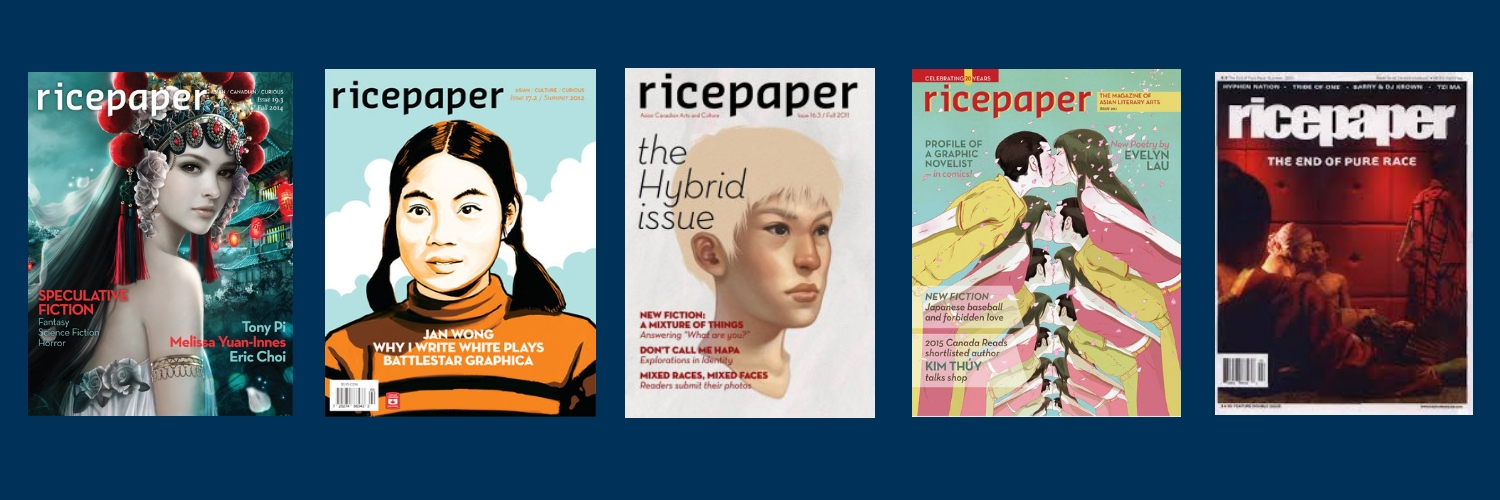
I’m working on the “about” Patreon page and looking back at the amazing magazine covers that Ricepaper has had in the past. There are days when my family and friends suggest I should quit Ricepaper to concentrate on just being a writer, but I tell them that there are few platforms for Asians in English and I believe I’m doing good by helping this ship stay afloat.

Sharing a few covers and when the Patreon page is up I’ll post news about it and hopefully garner some support!